
Guides · 9 min read · Jun 26, 2026
Custom Fields in Shopify's New Customer Accounts: How to Collect and Manage Customer Data from the Profile
By Ritesh Vatwani
Quick answer
Shopify's new customer accounts are hosted by Shopify, so the old way of collecting custom fields through Liquid theme forms no longer works. Custom data still lives in customer metafields, but you now collect and edit it through a customer account UI extension that renders in the profile. An app like Accofy adds custom fields to the new customer account profile, syncs them to metafields, and lets customers edit their own data, with no theme code.
Shopify is moving every store from the classic (legacy) login to new customer accounts, a passwordless, fully hosted account experience. It's faster and more secure for shoppers, but it changes one thing many merchants quietly depended on: the ability to collect extra customer information at sign-up and let customers manage it later.
In the old setup, apps and developers injected custom registration forms into the /account pages using Liquid. New customer accounts don't work that way. The account area is hosted by Shopify and can only be extended through customer account UI extensions. If you've ever asked customers for a VAT/tax number, company name, country, phone, birthday, or a marketing preference at registration, this is the part of the migration you need to plan for.
This guide explains what changed, how custom fields work in the new customer account, and how to collect and manage that data from the profile, with no theme code.
What "custom fields" actually means on Shopify
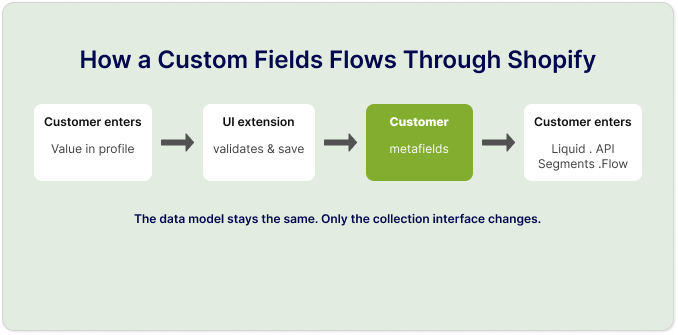
A custom field is any piece of information you want to store about a customer beyond Shopify's built-in fields (name and email). On Shopify, that data lives in customer metafields, which are structured, reusable storage attached to the customer record. Metafields are accessible in Liquid, the Admin API, Flow, segments, and discounts, which is what makes the data useful beyond the account page.
So "adding a custom field" really means two things:
- Defining a metafield (its name, type, and validation) to hold the value.
- Giving the customer a place to enter and edit that value.
In classic accounts, step 2 was a Liquid form. In new customer accounts, step 2 is a customer account UI extension that renders inside the Shopify-hosted profile.
Why the old way no longer works
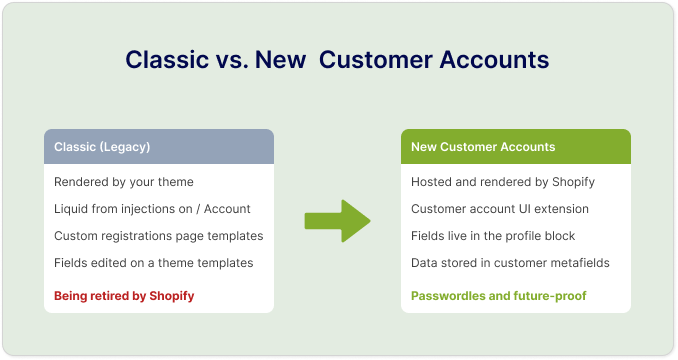
New customer accounts are hosted by Shopify at the shop.com/account (or an account.shop.com) domain and rendered by Shopify, not your theme. That means:
- Liquid form injections don't run in the account area anymore.
- Custom registration pages built on the old theme templates aren't part of the flow.
- Editable profile fields that used to sit on a theme page now need a UI extension to appear in the profile.
The data model didn't change, since metafields are still metafields, but the interface for collecting and editing them did. Merchants migrating to new customer accounts often find their custom fields simply stop appearing, even though the stored values are still there.
How custom fields work in the new customer account
Shopify exposes specific extension points where an app can add content to the account experience. The most relevant for custom fields is the profile block, which renders inside the customer's profile page. This is exactly where a customer account extension app places your fields so customers can view and edit them. This is what Accofy does: it adds your custom fields directly to the new customer account profile, so customers can see and update them in the same place they manage their name and email.
A well-built setup gives you:
- Field definitions managed from the app, synced to Shopify customer metafields (usable in Liquid, API, segments, and Flow).
- Field types like text, textarea, number, date, dropdown, checkbox, and country, with validation so customers enter information correctly.
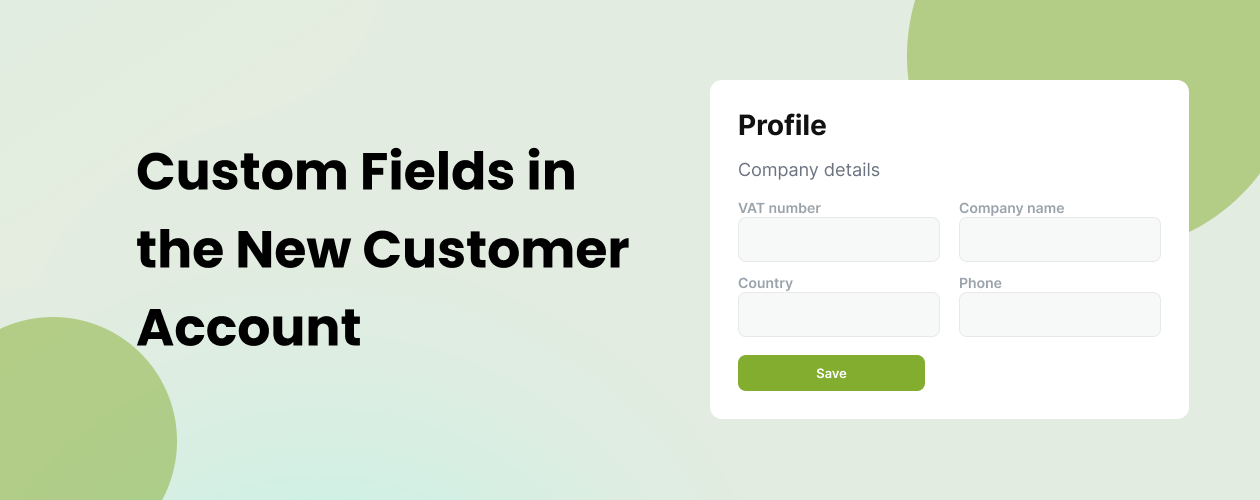
- Grouping, so related fields (for example "Company details": VAT number, company name, country, phone) appear together in the profile.
- An editable profile, letting customers update their own information without contacting support.
- Enable/disable control per field, so you can roll fields out without deleting their data.
In practice this mirrors what merchants used to do with a registration form. It just renders natively inside Shopify's hosted account instead of on a theme page.
Common ways merchants use custom fields to collect customer information
Custom fields are how you turn a generic account into a record that actually serves your business. A few of the most common patterns:
- Collect B2B and wholesale details. Capture a VAT/tax ID (DDV number), company name, country, and business phone so you can qualify, tag, and bill business customers correctly. This is the single most common reason merchants need custom fields, because Shopify's default fields don't cover company data.
- Personalize marketing and merchandising. Ask for birthdays, product interests, sizes, or communication preferences, then use those metafields to segment customers and tailor email, offers, and on-site content.
- Let customers self-serve their data. An editable profile means customers update their own company info, phone number, or preferences, which means fewer support tickets and cleaner data.
- Validate at the point of entry. Required fields and format validation keep your customer database accurate instead of full of typos and blanks.
- Power automation and segments. Because values are stored as customer metafields, you can build Shopify segments, trigger Flow automations, apply tags, and sync to your CRM or email tool based on what customers tell you.
- Auto-tag and route customers. Turn a field selection (for example "Customer type: Retailer / Wholesaler") into a customer tag automatically, so the right pricing, discounts, or content apply.
Moving from classic accounts: what to check
If you're migrating from classic to new customer accounts, walk through this short checklist:

- Inventory your existing custom fields. List every field your old registration form or app collected, and confirm where each value is stored (ideally a customer metafield).
- Confirm the data is in metafields. If values live only in a third-party app database, plan to sync them to Shopify metafields so they survive the move and stay usable.
- Rebuild the collection point as an extension. Replace any Liquid or theme form with a customer account UI extension that renders the same fields in the profile.
- Decide what's editable. Choose which fields customers can edit themselves versus which stay read-only.
- Re-test validation and required rules. Make sure your "required" and format rules still apply in the new interface.
- Verify downstream uses. Check that segments, Flow automations, tags, and CRM syncs still read the same metafields.
Choosing an app for custom fields on new customer accounts
You have two broad options for getting custom fields into the new customer account.
Native metafields only. You can define customer metafields in Shopify admin and surface a few of them, but you'll be limited on form-building, validation, grouping, conditional logic, and a polished editable profile, and staff, not customers, do most of the editing.
A customer account extension app. An app purpose-built for the new customer accounts gives you a no-code field builder, syncs everything to metafields, groups fields in the profile, validates input, and lets customers edit their own data. These are the same capabilities merchants relied on in classic accounts, rebuilt for Shopify's hosted experience. Accofy is built for exactly this: it provides custom fields for the customer account profile, lets you group them (for example a "Company details" group with VAT number, company name, country, and phone), syncs every value to Shopify customer metafields, and gives customers an editable profile, all without touching theme code.
If you previously used a registration or custom-fields app on classic accounts and it hasn't moved to customer account UI extensions, an extension-native app is the direct replacement. Look for these essentials:
- Sync to Shopify customer metafields (not locked in the app).
- A profile block so fields appear and edit inside the hosted account.
- Multiple field types and validation.
- Field grouping for clean organization (for example, a "Company details" group).
- Enable/disable per field without losing data.
- Multi-language support, if you sell across regions.
The bottom line
New customer accounts are the future of the Shopify storefront login, and they're a better experience for shoppers, but they retire the old way of collecting custom customer data through theme forms. The data model is unchanged: your custom fields still live in customer metafields. What changes is how you collect and edit them, which now happens through a customer account UI extension rendered inside the profile.
If you depend on company data, B2B/tax details, marketing preferences, or any field beyond name and email, the move to new customer accounts is the moment to set this up properly: define your fields, sync them to metafields, and give customers a clean, editable profile to manage their own information.
Want to add custom fields to your new customer account profile without touching theme code? Accofy lets you build, group, and sync custom fields to the customer account profile in minutes.